
Let’s talk about the elephant in your budget: that growing pile of SaaS subscriptions you’re not entirely sure you need.
Every month, another $29 here, $99 there. A “game-changing” AI tool your marketing team insisted on. A project management platform that was supposed to fix collaboration (but didn’t). Three different video conferencing apps because nobody can agree on one.
The SaaS industry has made it remarkably easy to acquire software. A credit card and five minutes is all it takes. What they don’t tell you is how those subscriptions compound into a significant expense—often for tools that duplicate functionality you already have.
Before you click “Start Free Trial” on the next promising solution, let’s establish a framework for knowing when a SaaS tool is a strategic asset and when it’s just digital clutter with a monthly invoice.
Lorem ipsum dolor sit amet, consectetur adipiscing elit. Ut elit tellus, luctus nec ullamcorper mattis, pulvinar dapibus leo.
The Seduction of Shiny Software
There’s a reason SaaS signup rates are so high. These companies have perfected the art of making software feel essential:
The sleek demo shows exactly the workflow you wish you had, conveniently skipping the six weeks of configuration required to get there.
The “Free Trial” removes any barrier to starting, knowing most people won’t cancel before the billing kicks in.
Feature lists are designed to trigger FOMO—surely you need AI-powered insights and real-time collaboration sync, right?
Case studies show transformative results that somehow never mention the army of consultants involved.
None of this is inherently dishonest. But it does create an environment where businesses accumulate software based on perceived potential rather than actual need.
The First Question: Problem-Solution Fit
Before evaluating any SaaS tool, ask one simple question:
What specific pain point does this solve, stated in one sentence?
Not “it would be nice to have.” Not “it might help with.” A specific, concrete problem that’s actually costing you money, time, or sanity right now.
If you can’t articulate the problem clearly, you don’t need the solution yet.
Here’s the trap: many SaaS purchases are attempts to solve process problems with technology. If your team isn’t communicating well, adding Slack won’t fix the culture—it will just make the silence more visible (and more expensive).
**Real Problem** | **Technology Can Help** |
We can’t find customer data | A CRM might be appropriate |
Data exists but team doesn’t use it | That’s a training/process problem |
We need to send mass emails | Email platform makes sense |
Nobody opens our emails | That’s a content/strategy problem |
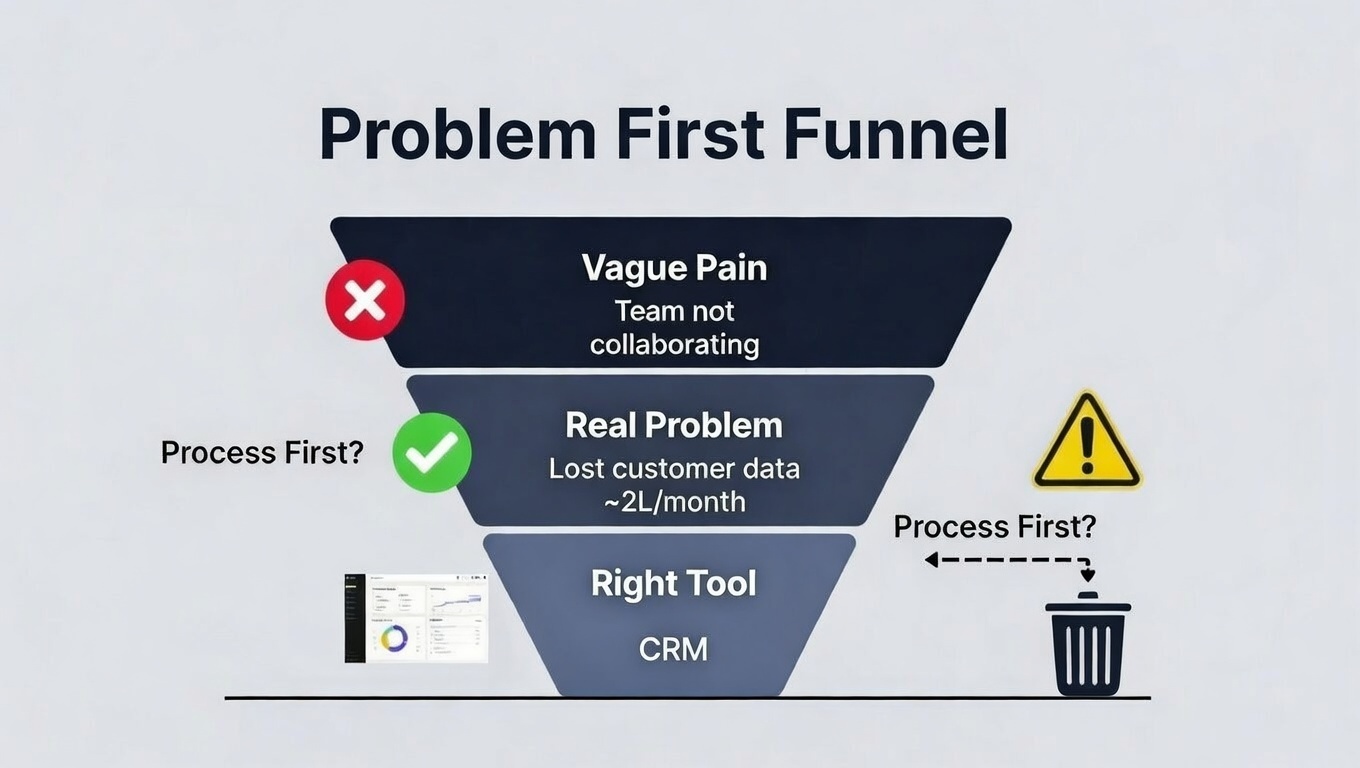
The litmus test: If removing this tool tomorrow would cause immediate, measurable harm to your operations, it’s probably essential. If nobody would notice for a week, question why you have it.
The True Cost Is Never the Sticker Price
SaaS pricing is designed to look affordable. $49/month sounds reasonable. But the actual cost is always higher:
Onboarding and Training
How many hours will your team spend learning the new system? Those hours have a real cost—whether it’s billable time not spent on clients or productivity lost during the learning curve.
Multiply the hourly cost of everyone involved by the realistic training time. Add that to year one’s price.
Integration Debt
Modern businesses run on interconnected tools. A new SaaS rarely works in isolation. Ask yourself:
- Does it integrate natively with your existing stack?
- Will you need a tool like Zapier to connect it? (That’s another subscription.)
- Will someone need to build custom integrations? (That’s development time.)
- What happens to your data if integrations break?
The "Seat Creep" Problem
That $29/user/month tool seems cheap until your team grows. Suddenly your “affordable” solution is a $3,480 annual expense—and growing with every new hire.
Calculate the 3-year cost with realistic headcount growth. The number is usually sobering.
Opportunity Cost
Every hour spent learning, configuring, and managing a new tool is an hour not spent on something else. The tool needs to deliver enough value to justify not just the subscription but the attention it demands.
The Shadow IT Audit: What Do You Already Have?
Before buying something new, do you actually know what you already have?
“Shadow IT” is the phenomenon where different teams or individuals sign up for tools without centralized knowledge or approval. The result: organizations often pay for multiple tools that do the same thing.
Right now, your company might have active subscriptions for:
- Multiple project management platforms (Asana, Monday, Trello, Notion…)
- Several communication tools (Slack, Teams, Discord…)
- Overlapping AI writing assistants
- Redundant design or document tools
- Video conferencing across Zoom, Teams, and Google Meet

Before adding anything new, audit what exists:
- What tools does each team currently use?
- Which tools have features you’re not using?
- Could upgrading an existing tool eliminate the need for a new one?
- Are there tools being paid for that no one touches?
Often, the solution isn’t a new subscription—it’s actually using what you already have.
The Consolidation Question
Here’s a pattern worth watching: specialized tools expand into adjacent areas, while “all-in-one” platforms keep adding features.
The CRM wants to be your email marketing platform. The project management tool adds video conferencing. The accounting software builds in invoicing, payments, and now CRM features.
Sometimes consolidating makes sense:
- Fewer tools to manage and train on
- Data lives in one place
- Lower total cost than multiple specialized tools
Sometimes it doesn’t:
- “Jack of all trades, master of none” functionality
- You’re locked into one vendor’s ecosystem
- The consolidated feature is worse than the specialized alternative
Ask: Is this feature good enough to replace our specialized tool? Or is it just good enough to check a box?
Data Sovereignty: The Exit Strategy Test
When you sign up for a SaaS, you’re handing over data. Customer information, project details, communication history, financial records—whatever the tool touches, the vendor controls.
Ask yourself before signing up:
How easy is it to export data in a usable format?
Can you get a clean CSV, JSON, or standard format export? Or does the platform make it difficult—trapping your data to prevent switching?
What happens if they raise prices dramatically?
It’s happened repeatedly. A platform gains market share, then increases prices knowing customers are locked in. What’s your leverage if that happens?
What happens if they get acquired or shut down?
Startups fail. Companies get bought. Features get sunset. If this tool disappeared tomorrow, what would you lose and how quickly could you recover?
Red flag: If a platform makes it hard to leave, that’s telling you something about their confidence in keeping you through value versus lock-in.
The Minimalist Stack Philosophy
Here’s a counterintuitive truth: the best software stack isn’t the one with the most tools. It’s the one with the fewest tools that get the job done.
Every tool adds:
- Cost (obvious)
- Training overhead
- Security surface area
- Integration complexity
- Management burden
- Context switching for users
The goal isn’t having the best tool for every function. The goal is having a coherent system where information flows, people know where to find things, and the overhead of managing tools doesn’t exceed the value they provide.
Questions to guide minimalist thinking:
- Could we do this with tools we already have, even if slightly less elegantly?
- Is this genuinely a separate function, or are we creating artificial separation?
- Would eliminating this tool force us to simplify our process (possibly a good thing)?
When the Answer Is Actually - Yes ?
To be clear: SaaS tools can be genuinely valuable. The right tool at the right time can:
- Automate genuinely tedious work
- Enable capabilities you couldn’t build yourself
- Scale operations without proportional headcount
- Provide expertise you don’t have in-house
The question isn’t whether SaaS is ever worth it. It’s whether this specific tool solves this specific problem at this specific cost better than alternatives—including doing nothing.
Signs a SaaS purchase makes sense:
- You can articulate the problem clearly in one sentence
- You’ve confirmed you don’t already have something that does this
- You’ve calculated total cost of ownership, not just sticker price
- You’ve verified data portability and exit options
- The tool solves the problem, not just addresses symptoms of a process issue
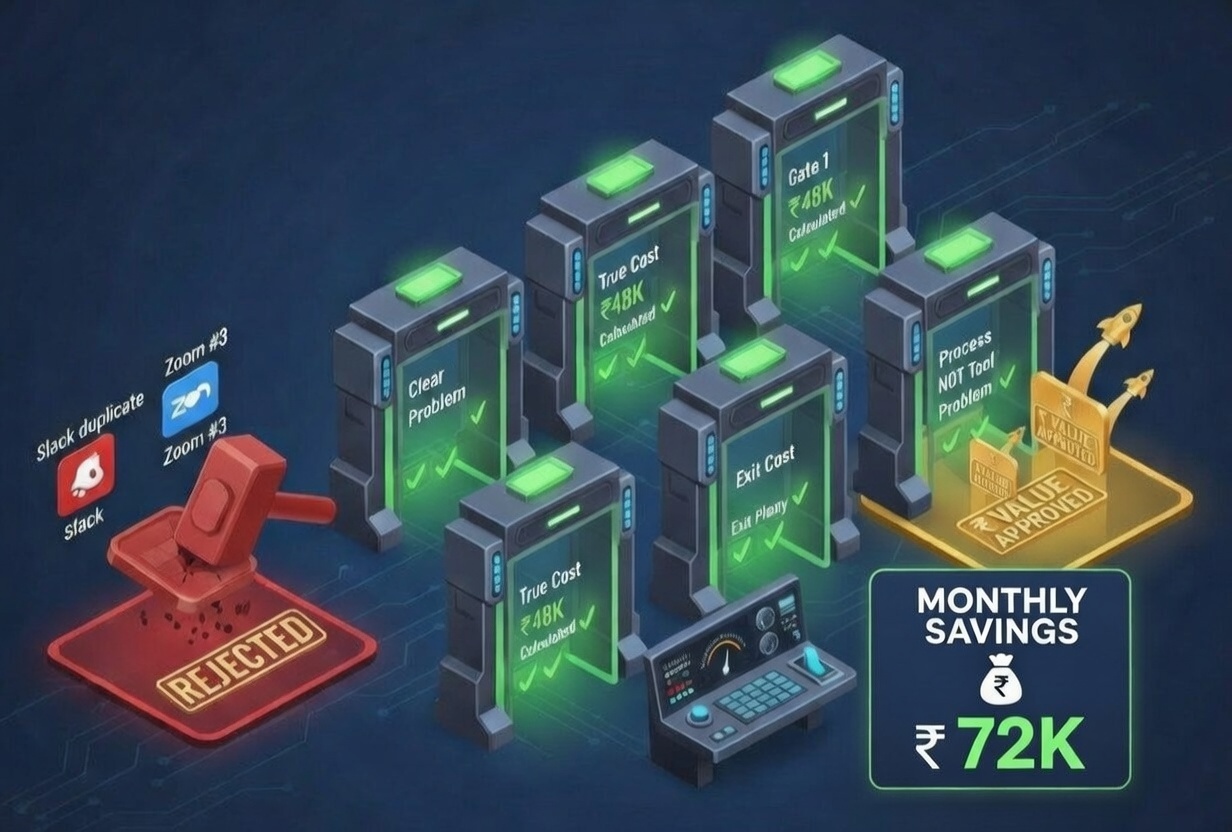
The Decision Framework
Before any SaaS purchase, run through this checklist:
- What specific problem does this solve? (One sentence, concrete, current)
- Do we already have something that does this? (Audit existing tools first)
- What’s the true total cost? (Include training, integration, seat growth)
- Can we get our data out easily? (Export test before committing)
- What’s the plan if this vendor disappears or raises prices? (Exit strategy)
- Is this solving a tool problem or a process problem? (Be honest)
If you can answer all six confidently, proceed. If you hesitate on any, dig deeper before subscribing.
Frequently Asked Questions
How do I know if my business has too many SaaS subscriptions? Audit your subscriptions by asking: Does every team member know about every tool? Are any tools redundant? What’s the total monthly spend? Are there tools that would go unnoticed if cancelled? If you can’t answer these questions quickly, you likely have subscription sprawl.
What is the total cost of ownership for SaaS? Total cost of ownership includes the subscription fee plus: training time for your team, integration costs with other tools, per-seat costs as you grow, and the opportunity cost of time spent managing the tool. The advertised price is rarely the actual price.
Should I choose specialized tools or all-in-one platforms? It depends on your needs. Specialized tools often have superior functionality but create integration complexity and higher total cost. All-in-one platforms simplify management but may offer inferior features in any single area. Consider your team’s tolerance for complexity and which functions are truly critical.
What questions should I ask before buying any SaaS tool? Ask: What specific problem does this solve? Do we already have something that does this? What’s the total cost including training and integration? How easy is data export? What happens if this vendor fails or raises prices significantly? Is this solving a tool problem or a process problem?
How do I convince my team to consolidate SaaS tools? Start with visibility: show the total spend and the overlap. Identify which tools are actually being used versus just paid for. Calculate time spent switching contexts between tools. Often, the consolidation argument becomes obvious once people see the full picture.
When should I definitely invest in new SaaS? Invest when you have a clear, concrete problem the tool solves; when you’ve verified you don’t already have the capability; when the total cost is justified by measurable benefit; and when you’ve confirmed data portability and vendor stability. The right tool at the right time creates real value.
Looking for AI-powered marketing tools that actually deliver value? AI Marketing Technology focuses on results, not feature bloat—solutions designed to solve real problems without unnecessary complexity.
